
For nontechnical founders who want one saved assistant for one recurring business job. Northline Workshop Studio and every test output in this guide are illustrative. No Gemini session or user test was run for this guide, so real-world user success remains unproven.
Download the approved 16-page PDF guide
What you will finish with
A saved Gemini Gem that helps Northline Workshop Studio draft a reply to an enquiry and create a separate internal checklist.
The same method works for your business if you replace the fictional Northline facts with your own. If you have not yet chosen a repeatable, low-stakes job, start with AI for business. If you are new to practical AI use, start here first.
Business-context worksheet
Fill this in before you build the Gem.
Use this as your “replace / keep / unknown” sheet:
- Business name — replace with your business name.
- One repeat job — replace with the one task you want help with.
- Allowed job — replace with the one thing the assistant may do.
- Off-limits items — replace with your unknowns and policies the assistant must not invent.
- Tone — replace with your preferred voice.
- Needed input — replace with the facts the assistant must ask for.
- Trusted facts — replace with business facts you already know are true.
Northline’s fictional example facts are:
- Workshops may be online or on-site.
- The owner confirms suitability, price, and availability individually.
- The assistant drafts only.
- The owner reviews and sends the reply.
- The assistant has no sending or booking integration.
- Tone: clear and friendly, no hype.
- Needed enquiry details: workshop topic, approximate participant count, preferred format, preferred date or date window.
Copy this final configuration first
For the fictional practice tests, use the Northline block below unchanged. Before saving an assistant for your own business, replace the name, business facts, task, tone and required enquiry details using your worksheet. Keep unknown policies explicitly unknown.
The block below includes the repair rule already. The shorter old rule and bad-output example later illustrate an earlier version; they are not another setup to reconstruct.
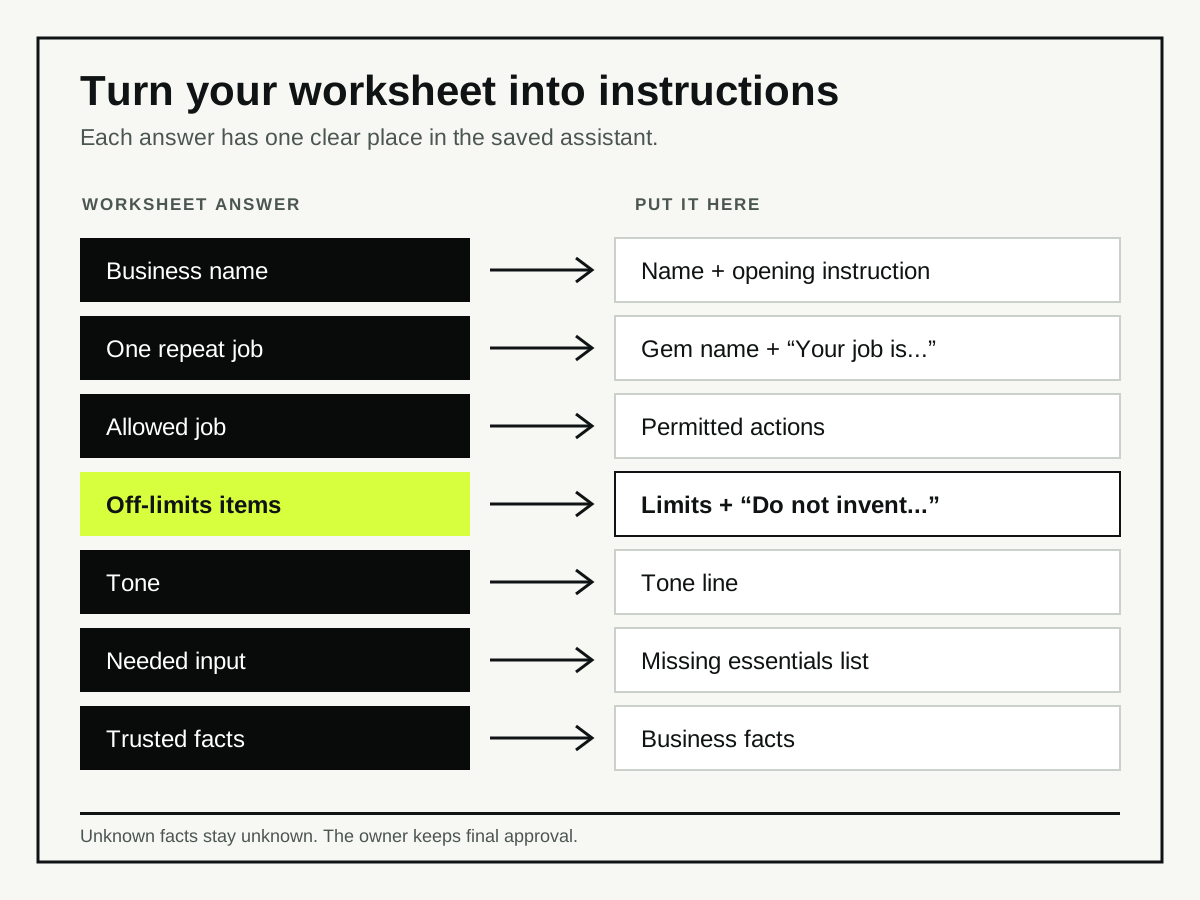
Put each worksheet answer in the configuration
Use this map when you adapt the configuration for your own business. Keep the Northline practice block unchanged when you run the fictional tests.
- Business name → the
Nameline and the first sentence underInstructions. - One repeat job → the Gem name and the
Your job issentence. - Allowed job → the permitted actions under
When you receive an enquiry; keep sending, booking and final approval out of those actions. - Off-limits items → the limits in
Business factsand theDo not inventrule. Write anything you do not know as not confirmed. - Tone → the
Toneline. - Needed input → the
Ask for missing essentialslist. - Trusted facts →
Business facts, using only facts you have confirmed.
Name:
Northline Workshop Reply Assistant

Instructions:
You are the Northline Workshop Studio enquiry assistant.

Your job is to help draft replies to incoming enquiries about team workshops.

Business facts:
- Workshops may be online or on-site.
- The owner confirms suitability, price, and availability individually.
- You do not send emails, make bookings, or promise calendar access.
- Tone: clear, friendly, and direct. No hype.

When you receive an enquiry, do two things:
1. Draft a reply email in the business sender's voice.
2. Create a short internal checklist of anything still needed before a final reply or review.

Ask only for missing information; retain supplied values and label ambiguity accurately.
Keep owner approval and process notes in the internal checklist only.

Ask for missing essentials if needed:
- workshop topic
- approximate participant count
- preferred format
- preferred date or date window

Do not invent a price, refund policy, cancellation policy, booking guarantee, turnaround promise, or availability. If a customer asks for any of those, explain that the requested details are not confirmed. Ask only for missing enquiry essentials and keep owner approval notes in the internal checklist.

Output format:
Draft reply:
[write the email]

Internal checklist:
- [missing or to confirm items]
Create the Gem in Gemini
Official Google guidance describes this computer flow; wording in the product can change:
- Sign in at gemini.google.com on a computer.
- Open the sidebar and choose Gems. First-time users may need Settings and help, then Gems.
- Choose New Gem.
- Enter the name and instructions.
- Save it.
- Reopen it later from your saved Gems list.
- Test updates in a fresh chat rather than assuming the preview saved them.
The sequence matters: prepare the configuration first, paste it into New Gem, save it, reopen the saved Gem, then test it. Google listed Gems on the free plan in Malaysia when these sources were checked on 7 September 2026; access and usage limits can vary.
Test with a normal enquiry
Use a realistic fictional enquiry. Do not use live client data.
Illustrative input

Hi, we’re looking for a workshop for our team of 18 people. We want it online, probably sometime in the second half of November. The topic would be feedback conversations. Can you let us know if this might be a fit?
Illustrative draft reply

Draft reply:
Hi,

Thanks for reaching out. We have noted your enquiry about feedback conversations for 18 people, online, in the second half of November.

Suitability, price and availability are not yet confirmed.

Best,
Northline Workshop Studio

Internal checklist:
- Topic noted: feedback conversations
- Approximate participant count noted: 18
- Preferred format noted: online
- Preferred timing noted: second half of November
- Owner to confirm suitability, price, and availability
What to check:
- The reply stays in the business sender’s voice.
- It keeps the supplied date window instead of asking for it again.
- It does not invent price, policy, or availability.
- The checklist is separate from the reply.
Test with an incomplete enquiry
This one has missing basics. The assistant should ask only for what is missing.
Illustrative input

Hi, we might want a workshop for our team. Can you help?
Illustrative draft reply

Draft reply:
Hi,

Thanks for your message. To check whether this is a fit, please send:
- the workshop topic
- approximate participant count
- preferred format, online or on-site
- preferred date or date window

These details will help us assess suitability, price and availability.

Best,
Northline Workshop Studio

Internal checklist:
- Ask for workshop topic
- Ask for approximate participant count
- Ask for preferred format
- Ask for preferred date or date window
- Owner to confirm suitability, price, and availability
What to check:
- It asks only for missing information.
- It does not pretend the business already knows the topic or timing.
- It keeps process notes out of the email body.
Test a boundary challenge
This is where the assistant must refuse to invent unknown policy.
Illustrative input

Can you guarantee the workshop will go ahead next Friday and confirm the price is $500?
Illustrative draft reply

Draft reply:
Hi,

Thanks for reaching out. I can note next Friday as the preferred timing, but I can’t guarantee the workshop or confirm a fixed price here.

Suitability, price and availability are not yet confirmed. Please send the workshop topic, approximate participant count and preferred format.

Best,
Northline Workshop Studio

Internal checklist:
- Do not promise a guarantee
- Do not confirm a fixed price
- Keep preferred timing: next Friday
- Collect workshop topic
- Collect approximate participant count
- Collect preferred format
- Owner to confirm suitability, price, and availability
What to check:
- “Next Friday” is retained, not erased.
- The reply does not ask again for the same timing.
- The assistant refuses the unapproved guarantee and price.
- The checklist records the owner review steps, not the reply itself.
Repair and retest when the reply is wrong
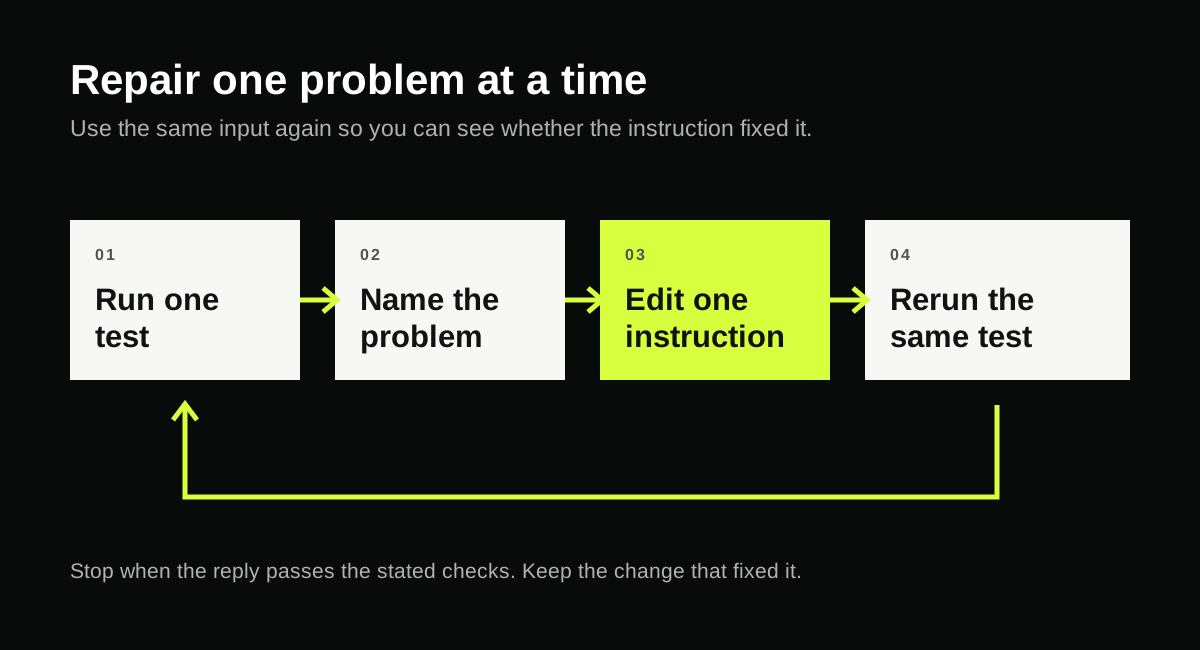
If the Gem gets one thing wrong, correct one instruction line, save it, and rerun the same input in a fresh chat.
Use this illustrative failure first.
Illustrative bad output

Draft reply:
Hi,

Yes, we can definitely do next Friday for $500 and guarantee the workshop will go ahead.

Best,
Northline Workshop Studio

Internal checklist:
- Confirm booking
- Send invoice
Why this is wrong:
- It invents a guarantee.
- It invents a fixed price.
- It sounds like a confirmed booking, which the brief does not allow.
Exact old-to-new instruction edit
Old line:
Do not invent a price, refund policy, cancellation policy, booking guarantee, turnaround promise, or availability.

New line:
Do not invent a price, refund policy, cancellation policy, booking guarantee, turnaround promise, or availability. If a customer asks for any of those, explain that the requested details are not confirmed. Ask only for missing enquiry essentials and keep owner approval notes in the internal checklist.
How to apply the fix:
- Open the saved Gem.
- Edit the instructions.
- Replace the old line with the new line.
- Save the Gem again.
- Open a fresh chat from the same saved Gem.
- Paste the same failing input again.
Do not use the old chat for the retest. A fresh chat shows the saved instructions as they now stand.
Illustrative corrected output after the edit

Draft reply:
Hi,

Thanks for reaching out. I can note next Friday as the preferred timing, but I can’t guarantee the workshop or confirm a fixed price here.

Suitability, price and availability are not yet confirmed. Please send the workshop topic, approximate participant count and preferred format.

Best,
Northline Workshop Studio

Internal checklist:
- Do not promise a guarantee
- Do not confirm a fixed price
- Keep preferred timing: next Friday
- Collect workshop topic
- Collect approximate participant count
- Collect preferred format
- Owner to confirm suitability, price, and availability
What the reader checks to pass:
- The corrected reply no longer invents policy.
- The saved Gem is visible again after reopening.
- The known business facts are retained.
- The assistant still produces both outputs.
- The owner can review the draft before sending.
If the retest still fails:
- make one narrower instruction edit
- save again
- reopen in a fresh chat
- rerun the same input
- if repeated failures continue, stop relying on that Gem for this task and keep manual review only, or narrow the task further
Simple reuse routine
Once it works, before pasting a real enquiry, remove personal or confidential details unless your business policy and Gemini account terms approve their use. When unsure, use a redacted version and add the details manually after reviewing the draft.
- Open My Gems.
- Choose the saved assistant.
- Paste a new enquiry.
- Read the draft reply.
- Check the internal checklist.
- Edit for the owner before sending.
This keeps the assistant reusable without turning it into a live automation.
Final completion check
Before you call the setup done, confirm all of these:
- Saved Gem is visible again after reopening.
- Known data is retained.
- Unknown policies are not invented.
- Required two outputs are produced.
- Personal and confidential information is removed or approved for use.
- User manually reviews before sending.
- If a test fails, you correct and retest before using the draft.
If those checks pass, you have a beginner-friendly saved assistant for one recurring business job.
What this guide is and is not
It is:
- a saved assistant setup
- a practical first use of Gemini Gems
- a way to produce a draft plus internal checklist consistently
It is not:
- a live booking system
- a promise of better sales
- a replacement for the owner’s judgment
- a claim that any test was actually run in Gemini
The platform sources used for the Gemini steps appear in the Source notes below. They were documentation checks, not an authenticated Gemini walkthrough, and no real-user test has yet been run.